Orders are dispatched the same day if placed before 3pm (Monday to Friday). Find out more

Have you replaced your charging connector and now your network is not working? We will explain why and how to fix it.

The module called the "charging connector" is a small card comprising several components, namely the charging connector through which you can charge your battery, the microphone and the antenna enabling you to transmit and receive the network.

This part can be replaced in the following cases: 

- your microphone no longer works

- the charging function no longer works

It is possible that after replacing this part, you will no longer have network coverage!

So why is this?

Samsung S21 charging connector

The main reason for this problem is undoubtedly the origin of your phone.

Nowadays, it is increasingly easy and common to buy a phone online, particularly on marketplaces. As a result, it is possible to own a phone that was not manufactured for the European market.

It is important to note that there are some differences between phones sold for the European market and those sold for Asia or America. This is the case for parts that connect to the network, such as the charging connector.

The frequencies emitted by telecommunications antennas vary depending on the territory

The frequencies (megahertz) of telecommunications networks are not the same in Europe, America, Asia, etc. Telephones are therefore designed according to the frequency bands of the telecommunications networks in the market where the telephone will be sold.

The source of the problem after changing the charging connector 

If you are experiencing network issues after changing your charging connector, it is probably for the following reasons:

- Your phone was not intended for the European market

AND

- your new charging connector was designed for the European market

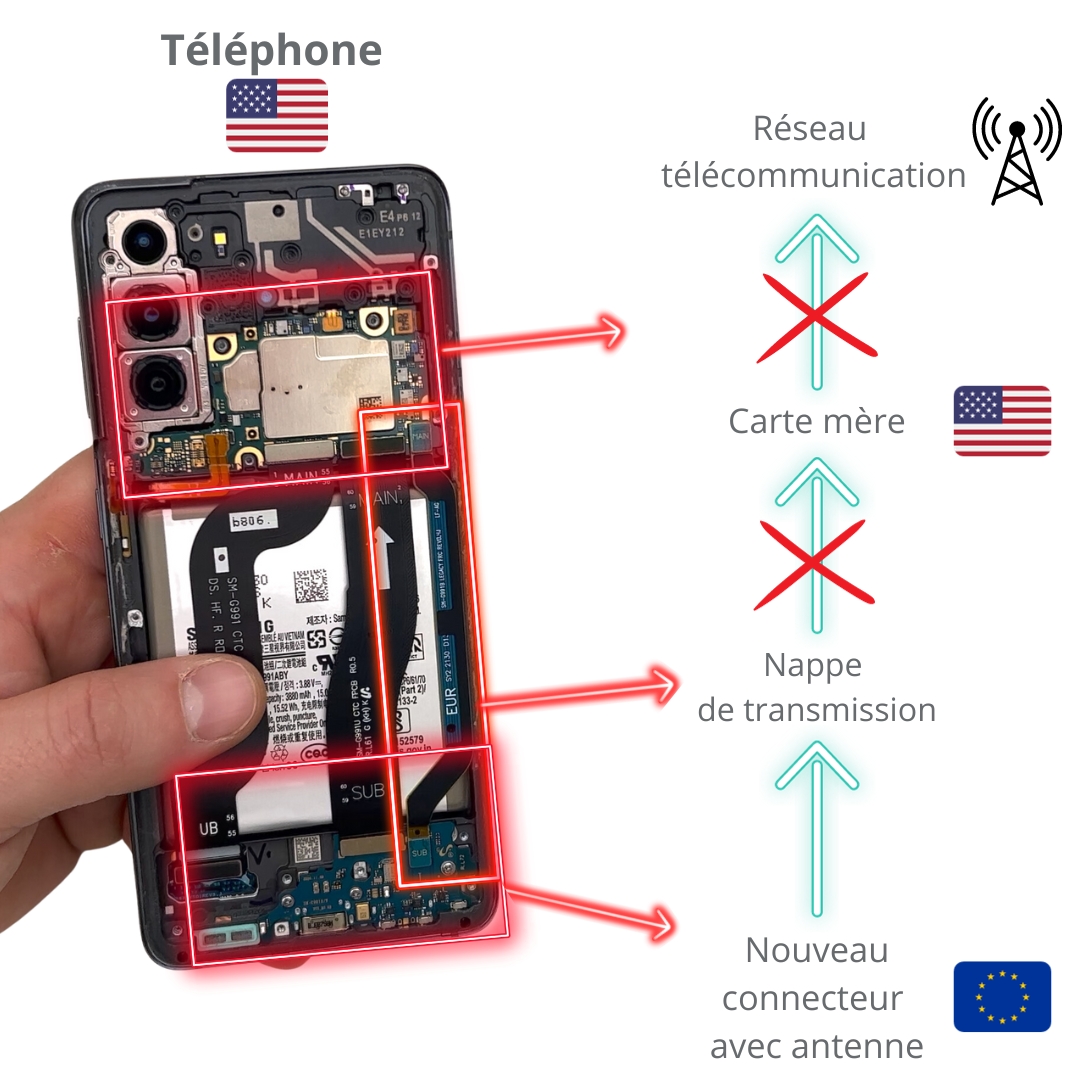
The phone's motherboard will not recognise the frequency emitted by the new charging connector's antenna and will not be able to transmit the phone's network to the external telecommunications network.

Example of a phone designed for the USA and a charging connector designed for Europe

So how can you avoid this network problem when you need to replace the charging connector?

1. Check where your phone was manufactured

Before ordering your new charging connector, check where your phone comes from. 

To do this, simply check the model number.

Where to find the model number

- on the phone box

- on the purchase invoice

- in the settings: "Settings > About phone"

The last letter of the reference number (with the "/") will tell you where it was manufactured. 

Here is the list of correspondences:

- B: Europe

- U or U1: United States

- W: Canada

- 0: China, Hong Kong or Taiwan

- N: South Korea

- P: Middle East

- E: other non-European countries


2. Purchase a charging connector from the same country as your phone

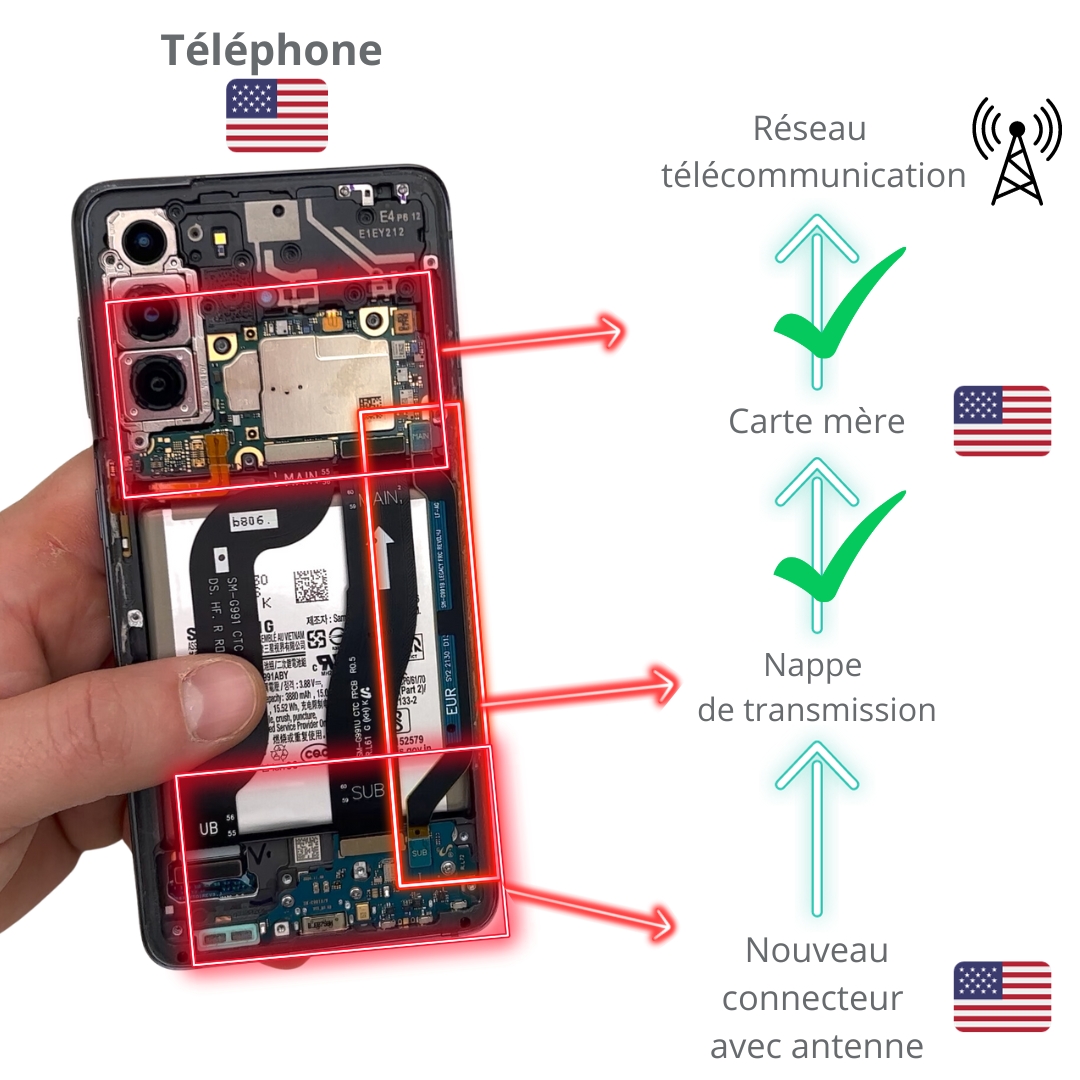
If your phone comes from the United States, for example, buy a charging connector that also comes from the United States.

This will enable the motherboard to read the signal and transmit it to the telecommunications network, eliminating any reception or transmission issues.

More articles

VISIT OUR BLOG
Advice
IPhone screen: understanding Hz and ProMotion

IPhone screen: understanding Hz and ProMotion

60 Hz, 90 Hz, 120 Hz, ProMotion: find out how the display frequency of an iPhone screen works,...

2025-11-28
Advice
What quality iPhone screen should I choose? TFT, INCELL, OLED, original

What quality iPhone screen should I choose? TFT, INCELL, OLED, original

TFT, INCELL, LTPS, hard and soft OLED, Service Pack, refurbished or pulled: find out which iPhone...

2025-11-26
News
OnePlus 13: Features and Release Date

OnePlus 13: Features and Release Date

OnePlus 13: Discover its features, innovations and expected release date. Everything you need to...

2025-03-04