Orders are dispatched the same day if placed before 3pm (Monday to Friday). Find out more

Have you changed the battery in your iPhone without going through a repair service Apple and now you're getting an error message? We'll explain why in this article!

The issue is as follows: you replaced your iPhone battery (without going through an authorised Apple technician) and an error message appeared when you turned your phone back on.

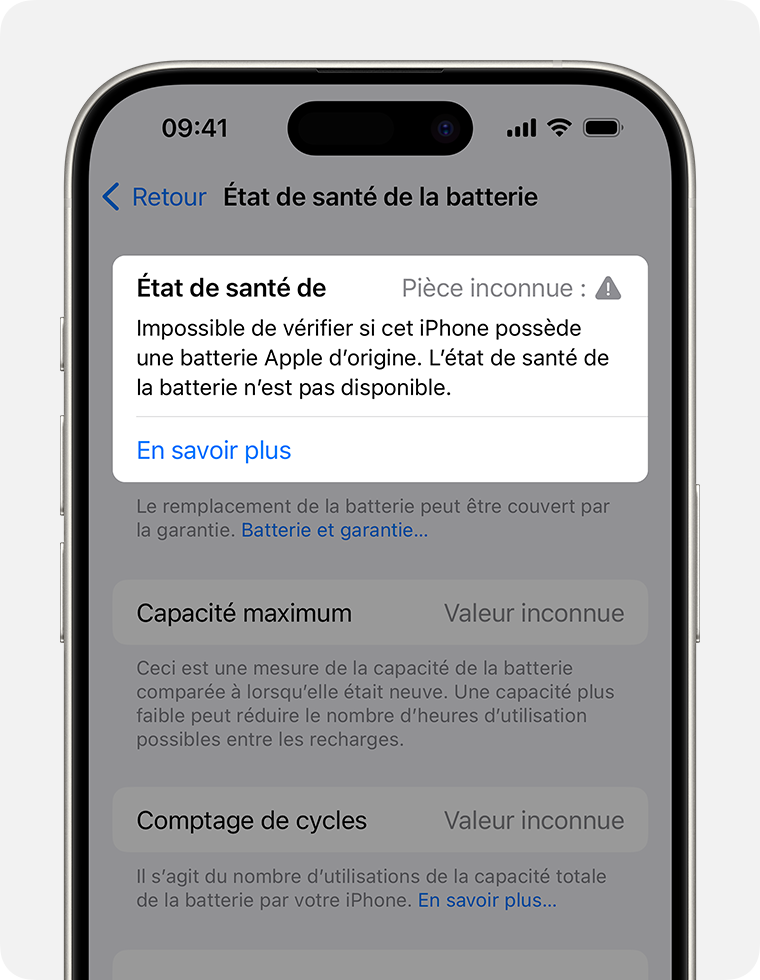
This message remains in your iPhone's settings ("Settings" > "Battery").

The iPhone initially displays "Unknown part" and then "Unable to verify if this iPhone has an original Apple battery. Battery health is no longer available."

This means that you no longer have access to the battery capacity percentage.

First of all, we will begin by giving you Apple's explanation

"The message 'Unknown part'  appears if the installation of the battery in question is incomplete, or in the following situations:

- The battery has been replaced with a non-original battery

- The battery has already been used or installed on another iPhone

- The battery is not functioning as expected

The message "Apple has updated the device information for this iPhone" may also appear. This means that Apple has updated the device information stored for this iPhone for service, security analysis, and to improve future products.

These messages do not affect your ability to use your iPhone or battery. "

Source: https://support.apple.com/fr-fr/HT210323

We therefore decided to test this by swapping the two original batteries from two identical iPhone 14s.

As you can see in the video opposite, swapping the batteries, even though they are both original, causes this error message to appear!

Are all iPhones affected?

All models from the iPhone XS series onwards are affected. If you have an iPhone from before this series, you are not affected by this issue.

Will the message remain?

Since the iOS 15.2 update, a new section has appeared in Settings: "Part History". In this section, the iPhone will indicate whether a part has been replaced and whether it is "original" or "unknown".

Before this update, this section did not exist and the error message disappeared after 15 days. 

So how can this phenomenon be explained?

It is important to note that all batteries have a serial number and what is known as a "microcontroller" that provides certain information about them, such as their capacity, temperature, etc. The microcontrollers in Apple batteries have an additional authentication function. If a battery other than the one designed for the device is connected to the phone, the motherboard will detect it and automatically display an error message. Only Apple technicians can remove the message after a battery replacement.

It should be noted that serial numbers for authenticating the original battery have been in use since the iPhone XS series. All previous models are therefore not affected by this issue.

So don't worry if you replace your battery! Even if it is an Apple battery, the message will still appear.

Apple. seems to be taking extra precautions to protect itself in the event of an incident after a part has been replaced by an unauthorised repairer or by the phone owner themselves. But as they themselves point out, this has no impact on the use of the device. You will simply no longer have access to the information provided by the microcontroller, such as battery capacity and temperature. 

Just like with the battery, replacing a screen or camera may trigger an error message. The mechanism that causes this message to appear is the same as for the battery, so there's no need to worry. For more information, we've created a screen replacement guide right here, as well as a rear camera replacement guide here.

However, please ensure that the parts you order are of good quality and are not damaged before connecting them to your phone.

More articles

VISIT OUR BLOG
Advice
IPhone screen: understanding Hz and ProMotion

IPhone screen: understanding Hz and ProMotion

60 Hz, 90 Hz, 120 Hz, ProMotion: find out how the display frequency of an iPhone screen works,...

2025-11-28
Advice
What quality iPhone screen should I choose? TFT, INCELL, OLED, original

What quality iPhone screen should I choose? TFT, INCELL, OLED, original

TFT, INCELL, LTPS, hard and soft OLED, Service Pack, refurbished or pulled: find out which iPhone...

2025-11-26
News
OnePlus 13: Features and Release Date

OnePlus 13: Features and Release Date

OnePlus 13: Discover its features, innovations and expected release date. Everything you need to...

2025-03-04