Orders are dispatched the same day if placed before 3pm (Monday to Friday). Find out more

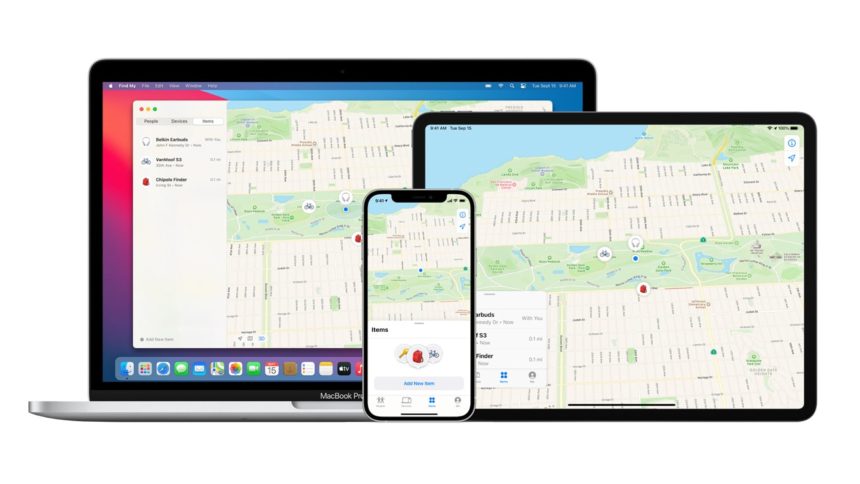
To locate a lost iPhone, you can use the "Find My iPhone" feature in Apple, which allows you to locate your device. Here's how to do it:

1. Use "Find My iPhone" via iCloud:

Go to iCloud.com: Open a web browser on your computer or another device and go to icloud.com.


  1. Sign in with your Apple ID: Enter your Apple ID and password. Make sure you use the same Apple ID that is linked to the lost iPhone.
  2. Go to "Find My iPhone": Once logged in, click on the "Find My iPhone" icon.  
  3. Select your iPhone: You will see a list of your devices Apple associated with your Apple ID. Select the lost iPhone from the list.
  4. Locate your iPhone: The app will display the location of your iPhone on a map. If the iPhone is turned on and connected to the Internet, you will be able to see its location in real time. If the iPhone is turned off, you will still have access to the last detected location.

If the iPhone is offline, you can enable the "Notify when found" option to be notified as soon as it is located.

2. Use the "Find My" app on another Apple device 

If you have another Apple device (iPhone, iPad, or Mac), you can also use the Find My app to locate your lost iPhone.

  1. Open the Find My app: On another iOS device, open the Find My app. If you are on an iPad or Mac, you can also access Find My via the app or via iCloud.com.
  2. Sign in with your Apple ID: Make sure you sign in with the same Apple ID used on the lost iPhone.
  3. Choose your iPhone: You will see your iPhone listed among your devices. Click on it to see its location on the map.

3. Ring your iPhone (if you are nearby)

If you think your iPhone is nearby, you can make it ring even if it is in silent mode.

  1. In the "Find My" interface on iCloud or the Find My app, select your iPhone and click "Play Sound".
  2. The iPhone will emit a sound for 2 minutes, which may help you find it if it is nearby.

4. Activate Lost Mode 

If you cannot find your iPhone immediately, you can activate "Lost Mode". This allows you to remotely lock the iPhone with a passcode and display a customised message (e.g. your phone number) on the screen.

  1. In the "Find My iPhone" interface, select your lost iPhone.
  2. Click on "Activate Lost Mode".
  3. Follow the instructions to set a remote passcode and add a contact message.

This can help protect your data and increase the chances that someone who finds your phone will be able to contact you.

5. Report the theft or loss to your operator 

If you are certain that your iPhone has been lost or stolen, contact your mobile operator to report it. They can block the SIM card.

6. Contact the police (in case of theft)

If you believe your iPhone has been stolen, you can also contact the local authorities. Apple provides a serial number and identifier for your device, which may be useful for recovery.

How do I activate the "Find My iPhone" feature?

Please note: For this method to work, "Find My iPhone" must be enabled on your device. If you did not enable this option before losing your device, you will not be able to use this feature.

If "Find My iPhone" is disabled or if the device is reset, it will be more difficult to locate it.

To enable this feature, go to your settings, click on your name, and then enable the "Find My iPhone" feature.

More articles

VISIT OUR BLOG
Advice
IPhone screen: understanding Hz and ProMotion

IPhone screen: understanding Hz and ProMotion

60 Hz, 90 Hz, 120 Hz, ProMotion: find out how the display frequency of an iPhone screen works,...

2025-11-28
Advice
What quality iPhone screen should I choose? TFT, INCELL, OLED, original

What quality iPhone screen should I choose? TFT, INCELL, OLED, original

TFT, INCELL, LTPS, hard and soft OLED, Service Pack, refurbished or pulled: find out which iPhone...

2025-11-26
News
OnePlus 13: Features and Release Date

OnePlus 13: Features and Release Date

OnePlus 13: Discover its features, innovations and expected release date. Everything you need to...

2025-03-04